# vim-vue-plugin [![Build Status][12]](https://travis-ci.com/leafOfTree/vim-vue-plugin)
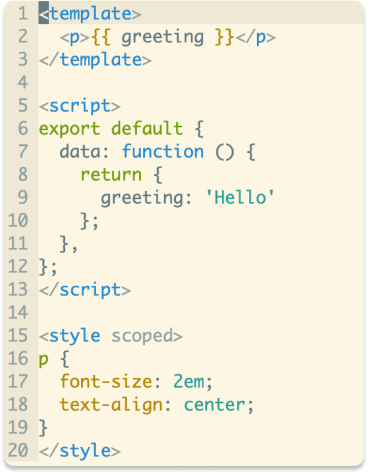
Vim syntax and indent plugin for `.vue` files. Mainly inspired by [mxw/vim-jsx][1].
## Upgrade to the latest version
If you installed `vim-vue-plugin` before 3/29/2021, it's recommended to upgrade to the latest version. After upgrade, You will have to configure in a new way as described at [Configuration](#configuration).
What's New
- Clean code and configuration
- Improved performance
## Installation
How to install
- [VundleVim][2]
Plugin 'leafOfTree/vim-vue-plugin'
- [vim-pathogen][5]
cd ~/.vim/bundle
git clone https://github.com/leafOfTree/vim-vue-plugin --depth 1
- [vim-plug][7]
Plug 'leafOfTree/vim-vue-plugin'
:PlugInstall
- Or manually, clone this plugin to `path/to/this_plugin`, and add it to `rtp` in vimrc
set rtp+=path/to/this_plugin
This plugin is effective if it has set `filetype` to `vue`. Please stay up to date. Feel free to open an issue or pull request.
## How it works
`vim-vue-plugin` will try to load multiple syntax and indent files for `.vue` and enable them to work together.
Supports
- Vue attribute(directive) and keyword.
- Blocks(both `template/script/style` and custome blocks) can use any syntax, including `less, sass, scss, stylus, coffee, typescript, pug, ...`
Relative syntax plugins need to be installed if not provided by vim.
- A built-in `foldexpr` foldmethod.
- [emmet-vim][10] HTML/JavaScript/CSS/... filetype detection.
- `.wpy` files from [WePY][6].
see [Configuration](#configuration) for details.
## Configuration
Now we use `g:vim_vue_plugin_config` as the only configuration variable.
- type: `dict`
- default:
```vim
let default = {
\'syntax': {
\ 'script': ['javascript'],
\ 'template': ['html'],
\ 'style': ['css'],
\},
\'full_syntax': [],
\'attribute': 0,
\'keyword': 0,
\'foldexpr': 0,
\'init_indent': 0,
\'debug': 0,
\}
```
### Description
- `syntax`*dict* A dictionary with the following key-value pairs
- `key`*string*: a block's tag name
- `value`*list*: a list of syntax name for the block.
- First, only syntax files from `['$VIMRUNTIME', '$VIM/vimfiles', '$HOME/.vim']` are loaded. If none is found, then **full** syntax files (including those from plugins) will be loaded
- The first item of `value` will be used as default syntax when no `lang="..."` appears on the block tag. `value` can be string if only one.
- Both Vue blocks and custom blocks are supported.
- `full_syntax`*list*: a list of syntax name whose **full** syntax files are always loaded
- `attribute`*0/1*: highlight Vue attribute as expression instead of string
- `keyword`*0/1*: highlight Vue keyword such as `data`, `methods`, ...
- `foldexpr`*0/1*: enable built-in `foldexpr` foldmethod
- `init_indent`*0/1*: enable initial one tab indent inside `script/style` tags
- `debug`*0/1*: echo debug messages in `messages` list
> For `0/1` value, set `0` to enable or `1` to disable
>
> Please check `:h dict`, `:h list` for details about the complex data types.
### Example
One possible usage
```vim
let g:vim_vue_plugin_config = {
\'syntax': {
\ 'template': ['html', 'pug'],
\ 'script': ['javascript', 'typescript', 'coffee'],
\ 'style': ['scss'],
\ 'i18n': ['json', 'yaml'],
\ 'route': 'json',
\ 'docs': 'markdown',
\},
\'full_syntax': ['scss', 'html'],
\'attribute': 1,
\'keyword': 1,
\'foldexpr': 1,
\}
```
## Archive
Documentation archive - 3/29/2021
Set global variable to `1` to enable or `0` to disable. Ex:
```vim
let g:vim_vue_plugin_load_full_syntax = 1
```
| variable | description | default |
|---------------------------------------|--------------------------------------------------------------------------------------------------------------------------------|----------------------------|
| `g:vim_vue_plugin_load_full_syntax`\* | Enable: load all syntax files in `runtimepath` to enable related syntax plugins.
Disable: only in `$VIMRUNTIME/syntax`, `~/.vim/syntax` and `$VIM/vimfiles/syntax`. | 0 |
| `g:vim_vue_plugin_use_pug`\* | Enable pug syntax for ``. | 0 |
| `g:vim_vue_plugin_use_coffee` | Enable coffee syntax for `