
5.0 KiB
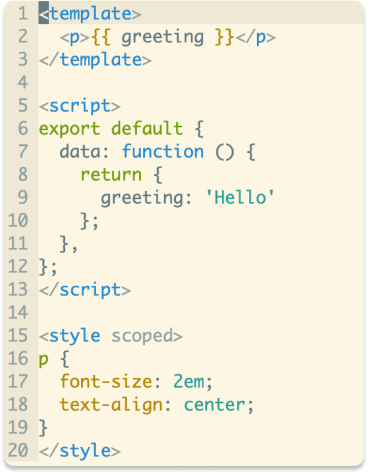
vim-vue-plugin
Vim syntax and indent plugin for .vue files. Mainly inspired by mxw/vim-jsx.
Install
-
Use VundleVim
Plugin 'leafOfTree/vim-vue-plugin' -
Use vim-pathogen
cd ~/.vim/bundle && \ git clone https://github.com/leafOfTree/vim-vue-plugin --depth 1 -
Use vim-plug
Plug 'leafOfTree/vim-vue-plugin' :PlugInstall -
Or manually, clone this plugin, drop it in custom
path/to/this_plugin, and add it tortpin vimrcset rpt+=path/to/this_plugin
The plugin works if filetype is set to vue. Please stay up to date. Feel free to open an issue or a pull request.
How it works
Since .vue is a combination of CSS, HTML and JavaScript, so is vim-vue-plugin. (Like XML and JavaScript for .jsx).
Supports
- Vue directives.
- Pug with vim-pug (see Configuration).
- Less/Sass/Scss (see Configuration).
- Coffee with vim-coffee-script (see Configuration).
- A builtin 'expr' foldmethod (see Configuration).
- emmet-vim HTML/CSS/JavaScript filetype detection.
.wpyfiles from WePY.
Configuration
Set global variable to 1 to enable or 0 to disable.
Ex:
let g:vim_vue_plugin_load_full_syntax = 1
| variable | description | default |
|---|---|---|
g:vim_vue_plugin_load_full_syntax* |
Enable: load all syntax files in runtimepath to enable related syntax plugins.Disable: only in $VIMRUNTIME/syntax, ~/.vim/syntax and $VIM/vimfiles/syntax |
0 |
g:vim_vue_plugin_use_pug* |
Enable vim-pug pug syntax for <template lang="pug">. |
0 |
g:vim_vue_plugin_use_coffee |
Enable coffee syntax for <script lang="coffee">. |
0 |
g:vim_vue_plugin_use_less |
Enable less syntax for <style lang="less">. |
0 |
g:vim_vue_plugin_use_sass |
Enable scss syntax for <style lang="scss">(or lang="sass" for sass). |
0 |
g:vim_vue_plugin_has_init_indent |
Initially indent one tab inside style/script tags. |
0 for .vue. 1 for .wpy |
g:vim_vue_plugin_highlight_vue_attr |
Highlight vue attribute value as expression instead of string. | 0 |
g:vim_vue_plugin_use_foldexpr |
Enable builtin foldexpr fold method. | 0 |
g:vim_vue_plugin_debug |
Echo debug messages in messages list. Useful to debug if unexpected indents occur. |
0 |
*: Vim may be slow if the feature is enabled. Find a balance between syntax highlight and speed. By the way, custom syntax could be added in ~/.vim/syntax or $VIM/vimfiles/syntax.
Note
filetypeused to be set tojavascript.vue, which causedjavascriptsyntax to be loaded multiple times and a significant delay. Now it isvueso autocmds and other settings forjavascripthave to be manually enabled forvue.g:vim_vue_plugin_use_foldexprdefault value used to be1. But there are other foldmethod choices, so it's changed to0.
Screenshot
Context based behavior
As there are more than one language in .vue file, the different behaviors like mapping or completion may be expected under different tags.
This plugin provides a function to get the tag where the cursor is in.
GetVueTag() => StringReturn value is 'template', 'script' or 'style'.
Example
autocmd FileType vue inoremap <buffer><expr> : InsertColon()

function! InsertColon()
  let tag = GetVueTag()

  if tag == 'template'
    return ':'
  else
    return ': '
  endif
endfunction
emmet-vim
Currently emmet-vim works regarding your HTML/CSS/JavaScript emmet settings, but it depends on how emmet-vim gets filetype and may change in the future. Feel free to report an issue if any problem appears.
Acknowledgments & Refs
License
This plugin is under The Unlicense.