
vim-vue-plugin 
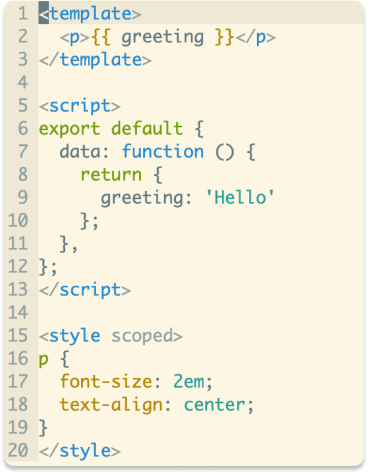
Vim syntax and indent plugin for .vue files. Mainly inspired by mxw/vim-jsx.
Installation
How to install
-
Plugin 'leafOfTree/vim-vue-plugin' -
cd ~/.vim/bundle && \ git clone https://github.com/leafOfTree/vim-vue-plugin --depth 1 -
Plug 'leafOfTree/vim-vue-plugin' :PlugInstall -
Or manually, clone this plugin to
path/to/this_plugin, and add it tortpin vimrcset rtp+=path/to/this_plugin
This plugin works if it has set filetype to vue. Please stay up to date. Feel free to open an issue or pull request.
How it works
Since .vue is a combination of CSS, HTML and JavaScript, so is vim-vue-plugin. (Like XML and JavaScript for .jsx).
Supports
-
Vue attribute(directive) and keyword.^
-
Less/Sass/Scss, Pug with vim-pug, Coffee with vim-coffee-script, TypeScript with typescript-vim or yats.vim, Stylus with vim-stylus. ^
Relative plugins need to be installed.
-
A builtin
foldexprfoldmethod.^ -
emmet-vim HTML/CSS/JavaScript filetype detection.
-
.wpyfiles from WePY.
^: see Configuration for details.
Configuration
Set global variable to 1 to enable or 0 to disable. Ex:
let g:vim_vue_plugin_load_full_syntax = 1
| variable | description | default |
|---|---|---|
g:vim_vue_plugin_load_full_syntax* |
Enable: load all syntax files in runtimepath to enable related syntax plugins.Disable: only in $VIMRUNTIME/syntax, ~/.vim/syntax and $VIM/vimfiles/syntax. |
0 |
g:vim_vue_plugin_use_pug* |
Enable pug syntax for <template lang="pug">. |
0 |
g:vim_vue_plugin_use_coffee |
Enable coffee syntax for <script lang="coffee">. |
0 |
g:vim_vue_plugin_use_typescript |
Enable typescript syntax for <script lang="ts">. |
0 |
g:vim_vue_plugin_use_less |
Enable less syntax for <style lang="less">. |
0 |
g:vim_vue_plugin_use_sass |
Enable sass syntax for <style lang="scss|sass">. |
0 |
g:vim_vue_plugin_use_scss |
Enable scss syntax for <style lang="scss">. |
0 |
g:vim_vue_plugin_use_stylus |
Enable stylus syntax for <style lang="stylus">. |
0 |
g:vim_vue_plugin_has_init_indent |
Initially indent one tab inside style/script tags. |
0+ |
g:vim_vue_plugin_highlight_vue_attr |
Highlight vue attribute value as expression instead of string. | 0 |
g:vim_vue_plugin_highlight_vue_keyword |
Highlight vue keyword like data, methods, ... |
0 |
g:vim_vue_plugin_use_foldexpr# |
Enable builtin foldexpr foldmethod. |
0 |
g:vim_vue_plugin_custom_blocks |
Highlight custom blocks. See details below. | {} |
g:vim_vue_plugin_debug |
Echo debug messages in messages list. Useful to debug if unexpected indents occur. |
0 |
*: Vim may be slow if the feature is enabled. Find a balance between syntax highlight and speed. By the way, custom syntax can be added in ~/.vim/syntax or $VIM/vimfiles/syntax.
#: In the case when it's enabled, the foldexpr is not efficient for large files, so it's not enabled initially when the line number exceeds 1000. You can enable it mannully by setlocal foldmethod=expr when required.
+: 0 for .vue and 1 for .wpy
Note
g:vim_vue_plugin_load_full_syntaxapplies to otherHTML/Sass/Lessplugins.filetypeis set tovueso autocmds and other settings forjavascripthave to be manually enabled forvue.
Custom blocks
You could enable syntax highlighting in a custom block by setting g:vim_vue_plugin_custom_blocks.
Its structure is { block: filetype } or { block: filetype[] }. When providing a filetype list, you need to add lang="..." in the tag. Otherwise, the first one will be used.
let g:vim_vue_plugin_custom_blocks = {
      \'docs': 'markdown',
      \'i18n': ['json', 'yaml', 'json5'],
      \}
<docs>
# This is the documentation for component.
</docs>

<i18n lang="yaml">
en:
  hello: "Hello World!"
ja:
  hello: "こんにちは、世界!"
</i18n>
Context based behavior
As there are more than one language in .vue file, the different behaviors like mapping or completion and local options, may be required under different tags or subtypes(current language type).
This plugin provides functions to get the tag/subtype where the cursor is in.
-
GetVueTag() => StringReturn value is one of'template', 'script', 'style'." Example autocmd FileType vue inoremap <buffer><expr> : InsertColon() function! InsertColon() let tag = GetVueTag() return tag == 'template' ? ':' : ': ' endfunction -
GetVueSubtype() => StringReturn value is one of'html', 'javascript', 'css', 'scss', .... -
OnChangeVueSubtype(subtype)An event listener that is called when subtype changes.You can also define an event listener function
OnChangeVueSubtype(subtype)in yourvimrcto get the subtype and set its local options whenever it changes." Example: set local options based on subtype function! OnChangeVueSubtype(subtype) echom 'Subtype is '.a:subtype if a:subtype == 'html' setlocal commentstring=<!--%s--> setlocal comments=s:<!--,m:\ \ \ \ ,e:--> elseif a:subtype =~ 'css' setlocal comments=s1:/*,mb:*,ex:*/ commentstring& else setlocal commentstring=//%s setlocal comments=sO:*\ -,mO:*\ \ ,exO:*/,s1:/*,mb:*,ex:*/,:// endif endfunction
emmet-vim
Currently emmet-vim works regarding your HTML/CSS/JavaScript emmet settings, but it depends on how emmet-vim gets filetype and may change in the future. Feel free to report an issue if any problem appears.
Avoid overload
Since there are many sub languages included, most delays come from syntax files overload. A variable named b:current_loading_main_syntax is set to vue which can be used as loading condition if you'd like to manually find and modify the syntax files causing overload.
For example, the builtin syntax sass.vim and less.vim in vim8.1 runtime and pug.vim in vim-pug/syntax always load css.vim which this plugin already loads. It can be optimized like
$VIMRUNTIME/syntax/sass.vim
- runtime! syntax/css.vim
+ if !exists("b:current_loading_main_syntax")
+   runtime! syntax/css.vim
+ endif
$VIMRUNTIME/syntax/vue.vim
-   runtime! syntax/html.vim
+ if !exists("b:current_loading_main_syntax")
+   runtime! syntax/html.vim
+ endif
Acknowledgments & Refs
See also
-
Svelte is a compilation web framework which shares a similar syntax to Vue.
License
This plugin is under The Unlicense. Other than this, lib/indent/* files are extracted from vim runtime.